Training pipelines
OhhO OS does not stop at control. The same package collects demonstrations, trains policies, and serves them back to the robot — one toolchain, one data schema, end to end.
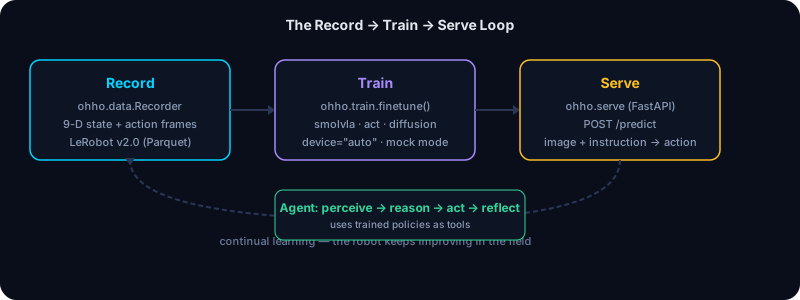
The loop
record  →  train  →  serve  →  (continual learning)
ohho.data  ohho.train   ohho.serve
1. Collect data
Record teleoperation episodes — base motion, arm joints and synchronized multi-camera video — in the standard LeRobot dataset format (Parquet + MP4):
from ohho.data import Recorder

rec = Recorder(bot, repo_id="local/mobile_manipulation", fps=10.0)
rec.start_episode(task="pick up the cup")

# Manual mode: capture frames as you teleop
bot.drive(vx=0.1)
rec.capture_frame()
bot.move_joints([0, -0.5, 0.5, 0, 0, 0.2])
rec.capture_frame()

rec.stop_episode()
rec.save("~/datasets/mobile_manipulation")
Or use timer mode for hands-free recording:
rec.record_episode(task="pick up the cup")  # background thread at fps Hz
# ...teleop...
rec.stop_recording()
rec.save("~/datasets/mobile_manipulation")
What gets recorded
Each frame captures a 9-D state + 9-D action vector (for mobile-manipulators):
| Field | Dimensions | Content |
|---|---|---|
observation.state |
9 | arm joints (6) + base velocity (3) |
action |
9 | commanded arm joints (6) + base velocity (3) |
For base-only robots (Go2), the state and action are 3-D (base velocity only).
The recorder intercepts drive() and move_joints() to capture the action, and
polls telemetry() for the state — so what you record is exactly what the robot
did.
Dataset format
The writer produces LeRobot v2.0 layout:
<dataset_root>/
  meta/
    info.json           # codebase_version, fps, features, dims
    tasks.jsonl         # {task_index, task}
    episodes.jsonl      # {episode_index, tasks, length}
  data/chunk-000/
    episode_000000.parquet   # or .jsonl without pyarrow
Parquet is used when pyarrow is available (the [data] extra); otherwise JSON
Lines keeps the record→inspect loop working with zero deps.
Read a dataset back
from ohho.data.reader import DatasetReader

reader = DatasetReader("~/datasets/mobile_manipulation")
print(reader.episode_count, reader.frame_count)
frames = reader.load_episode(0)
print(reader.stats())  # per-dimension min/max/mean
2. Train
Fine-tune the method that fits — VLA fine-tuning (SmolVLA, ACT, diffusion, OpenVLA) — selected by config, not a rewrite:
from ohho.train import finetune

ckpt = finetune(
    dataset="~/datasets/mobile_manipulation",
    policy="smolvla",          # smolvla | act | diffusion | openvla
    device="auto",             # cuda / mps / cpu, resolved for you
    num_epochs=100,
    batch_size=8,
    lr=1e-4,
)
Mock mode (no GPU needed)
For the record→train→serve loop on the simulator, use mock=True:
ckpt = finetune(
    dataset="~/datasets/demo",
    policy="smolvla",
    device="cpu",
    mock=True,            # writes a dummy checkpoint from dataset stats
)
This proves the wiring works end-to-end without a GPU. The mock checkpoint is a JSON file with the dataset metadata.
Supported policies
| Policy | Checkpoint | Notes |
|---|---|---|
smolvla |
lerobot/smolvla_base |
9-DOF mobile manipulation |
act |
lerobot/act_omnibot |
Action Chunking Transformer |
diffusion |
lerobot/diffusion_omnibot |
Diffusion policy |
openvla |
openvla/openvla-7b |
7B VLA (needs a sizeable GPU — we can recommend one) |
3. Serve
Expose the policy behind a REST endpoint your robot calls with an image and an instruction:
ohho serve --mock was run on the base install. It exited and asked for the serve extra (uvicorn is not installed). That extra was not installed in the check. See Install.
Endpoints
| Method | Path | Purpose |
|---|---|---|
GET |
/health |
{status: "ok", model_loaded: bool, device: str} |
POST |
/load_model |
Load a checkpoint (params: model_path) |
POST |
/predict |
InferenceRequest → InferenceResponse |
import requests
r = requests.post("http://localhost:8000/predict", json={
    "instruction": "pick up the cup",
    "image_base64": "<base64 JPEG>",
})
action = r.json()["action"]["vector"]  # 9-D: 6 arm + 3 base
Build a testable app (no server launch)
from ohho.serve import build_app
from fastapi.testclient import TestClient

app = build_app(model_path="checkpoint.json", mock_model=True, auto_load=True)
client = TestClient(app)
print(client.get("/health").json())
4. Continual learning
A post-training loop can re-train as new episodes and tasks arrive, with prioritized replay and outcome-stratified episodic memory — the robot keeps getting better from later episodes.
Hardware-aware everywhere
Every component takes device="auto" and selects the right execution provider
for your machine:
ohho profile detect is in the checked command list in Install. The profile name depends on the machine.
See Hardware Profiles (via ohho profile list) for the 5 built-in profiles:
pi_workstation, jetson_single, workstation_single, mac_dev, edge_cpu.