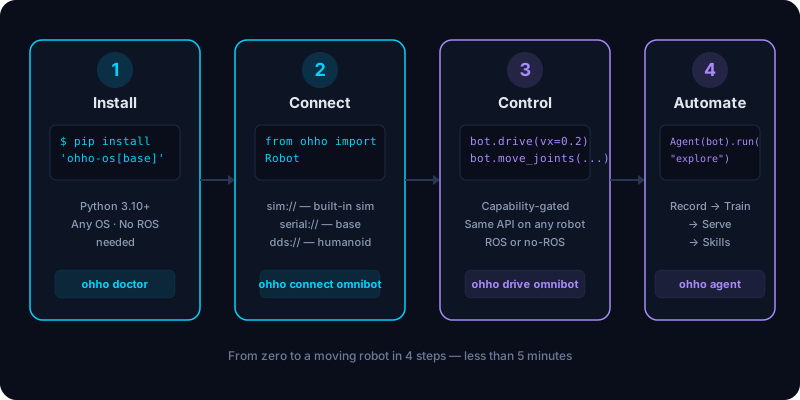
Setup Guide — From Zero to a Moving Robot
This guide walks you through installing OhhO OS on your computer, verifying the installation, connecting your first robot (real or simulated), driving it, and handing it an autonomous goal. No prior ROS or robotics experience needed.
Prerequisites
| Requirement | Details |
|---|---|
| Python | 3.10 or newer (python --version to check) |
| OS | Windows, macOS, or Linux (Ubuntu 24.04 for ROS 2 runtime) |
| Hardware | None required — a built-in simulator works out of the box |
| ROS 2 | Optional. Jazzy on Ubuntu 24.04 if you want the ROS 2 runtime |
Step 1 — Install OhhO OS
Open a terminal and install the core package:
pip install 'ohho-os[base]'
Not on PyPI yet? Until the package is published, install straight from the repository — same result, works today:
pip install "ohho-os[base] @ git+https://github.com/varunvaidhiya/OmniBotPro.git@main#subdirectory=sdk"or clone the repo and run
pip install -e sdkfrom its root.
This gives you the Robot Abstraction Layer, the native (no-ROS) runtime, the simulator, the CLI, and the agent brain — with zero heavy dependencies. It works on any OS.
Install extras for your robot
Add only the extras you need:
| Extra | What it adds | Install |
|---|---|---|
serial |
Yahboom serial adapter (OmniBot base) | pip install 'ohho-os[serial]' |
arm |
Feetech arm adapter (SO-101, OmniBot arm) | pip install 'ohho-os[arm]' |
unitree |
Unitree DDS adapter (Go2, G1, H1) | pip install 'ohho-os[unitree]' |
agent |
Real agent brain (agent_engine + Claude) | pip install 'ohho-os[agent]' |
data |
LeRobot Parquet dataset writer | pip install 'ohho-os[data]' |
train |
Training pipelines (torch + lerobot) | pip install 'ohho-os[train]' |
serve |
FastAPI inference server | pip install 'ohho-os[serve]' |
ros2 |
ROS 2 runtime backend (needs ROS 2 Jazzy) | pip install 'ohho-os[ros2]' |
all |
Everything above | pip install 'ohho-os[all]' |
Example — a no-ROS Unitree Go2 with training:
pip install 'ohho-os[base,unitree,train]'
Verify your installation
ohho doctor
You should see output like:
OhhO OS 1.0.1
python : 3.12.4
runtimes : native
adapters : sim (others via extras)
device : cpu
robots : omnibot, sim, unitree-go2
agent brain : scripted fallback (install 'ohho-os[agent]' + repo agent_engine)
serve : needs [serve] extra
data writer : json fallback (add [data] for parquet)
train : mock only (add [train] for real training)
recommended : runtime=native
ohho doctor reports your Python version, which runtimes are available (native
and/or ROS 2), which adapters are installed, the compute device, and the
built-in robots. If something is missing, it tells you exactly which extra to
install.
Step 2 — Connect Your First Robot
OhhO OS ships with three built-in robots and a simulator. You can start driving immediately — no hardware needed.
Option A: Use the simulator (no hardware)
from ohho import Robot
bot = Robot.connect("omnibot", transport="sim://")
print(bot)
# <Robot omnibot via sim on native>
The simulator runs in-process with holonomic physics and joint servoing. It's deterministic — great for testing and development.
Option B: Connect to a real OmniBot (Yahboom serial + Feetech arm)
pip install 'ohho-os[serial,arm]'
bot = Robot.connect("omnibot", "serial:///dev/ttyUSB0,/dev/ttyACM0")
# The comma tells OhhO to compose a base (Yahboom) + arm (Feetech) transport.
Option C: Connect to a Unitree Go2 (DDS)
pip install 'ohho-os[unitree]'
dog = Robot.connect("unitree-go2", "dds://eth0")
Option D: Connect via ROS 2
On an Ubuntu 24.04 machine with ROS 2 Jazzy sourced:
pip install 'ohho-os[ros2]'
bot = Robot.connect("omnibot", "ros2://", runtime="ros2")
# Publishes /cmd_vel, subscribes /odom and /arm/joint_states
Auto-detect runtime
If you don't specify a runtime, get_runtime("auto") prefers ROS 2 when rclpy
is available, and falls back to native otherwise:
bot = Robot.connect("omnibot") # → ros2 on ROS 2 machines, native elsewhere
CLI shortcut
ohho connect omnibot
# connected: <Robot omnibot via sim on native>
# status : connected — Simulator · omnibot
# odom : x=0.000 y=0.000 theta=0.000
Step 3 — Drive and Read Telemetry
Every robot exposes the same API. Capabilities a robot lacks are safe no-ops.
# Drive the base
bot.drive(vx=0.2, vy=0.0, w=0.3) # forward 0.2 m/s, turn 0.3 rad/s
bot.stop()
# Read telemetry
t = bot.telemetry()
print(t.odom) # Odometry(x=0.01, y=0.0, theta=0.015, vx=0.2, vy=0.0, omega=0.3)
print(t.joints) # [JointReading(name='arm_shoulder_pan', position=0.0), ...]
print(t.battery) # 0.97 (97%)
# Move the arm (no-op if the robot has no manipulation capability)
if bot.has("manipulation"):
bot.move_joints([0.0, -0.5, 0.5, 0.0, 0.0, 0.2]) # 6 DOF: shoulder → gripper
# Emergency stop
bot.emergency_stop() # zero all motion immediately
bot.release_stop() # resume
CLI shortcuts
ohho sim --robot omnibot --seconds 5 # drive a pattern in simulation
ohho drive omnibot --vx 0.15 --seconds 3 # drive forward for 3 seconds
Step 4 — Hand It a Goal (Agent)
The agent runs a continuous perceive → reason → act → reflect loop. It builds tools from the robot's capabilities and uses an LLM tool-calling reasoner (or an echo fallback when no LLM is available).
pip install 'ohho-os[agent]' # numpy + anthropic
export ANTHROPIC_API_KEY=sk-ant-...
The full harness brain also needs
agent_engine, which ships in the OmniBotPro repo (not on PyPI): clone it and runpip install -e agent_engine. Runohho doctor— theagent brainline tells you which brain is active.
from ohho.agent import Agent
agent = Agent(bot)
log = agent.run("explore the room and report what you see")
for line in log:
print(line)
Without the [agent] extra, the agent falls back to ScriptedBrain — a
deterministic no-dependency brain that exercises the robot.
CLI shortcut
ohho agent omnibot "explore the room"
Step 5 — Record Data, Train, and Serve (Optional)
The same package collects demonstrations, trains policies, and serves them back to the robot.
Record an episode
from ohho.data import Recorder
rec = Recorder(bot, repo_id="local/demo", fps=10.0)
rec.start_episode(task="pick up the cup")
for _ in range(50):
bot.drive(vx=0.1)
rec.capture_frame()
rec.stop_episode()
rec.save("~/datasets/demo")
# Writes LeRobot v2.0: Parquet + info.json + tasks.jsonl + episodes.jsonl
Train a policy
from ohho.train import finetune
ckpt = finetune(
dataset="~/datasets/demo",
policy="smolvla",
device="auto", # cuda → mps → cpu, resolved for you
mock=True, # no GPU needed — writes a dummy checkpoint
)
Serve the policy
ohho serve --checkpoint ./checkpoints/smolvla --port 8000 --mock
# Your robot calls the server:
import requests
r = requests.post("http://localhost:8000/predict", json={
"instruction": "pick up the cup",
"image_base64": "<base64 JPEG>",
})
action = r.json()["action"]["vector"] # 9-D: 6 arm + 3 base
Step 6 — Run Skills (Optional)
Skills are reusable behaviors registered with @skill:
ohho market list
# patrol v0.1.0 [base.drive] tags: navigation, demo
# wave v0.1.0 [manipulation] tags: arm, demo
# stop v0.1.0 [] tags: safety
# status v0.1.0 [] tags: diagnostics
ohho market run omnibot patrol
# skill 'patrol': patrol complete
Write your own skill:
from ohho.market import skill
@skill("dance", "Make the robot dance", requires=["base.drive"])
def dance(robot, speed=0.2):
robot.drive(vx=speed, w=0.8)
# ...
robot.stop()
return "dance complete"
Step 7 — Check Your Hardware Profile (Optional)
ohho profile detect
# detected: workstation_single
# Single GPU workstation runs everything (sim-only development, RTX-class GPU).
# platform: Linux x86_64
# device: cuda
Troubleshooting
| Problem | Solution |
|---|---|
ModuleNotFoundError: No module named 'ohho' |
pip install -e sdk from the repo root, or pip install ohho-os |
AdapterUnavailable: needs pyserial |
pip install 'ohho-os[serial]' |
AdapterUnavailable: needs lerobot |
pip install 'ohho-os[arm]' |
AdapterUnavailable: needs cyclonedds |
pip install 'ohho-os[unitree]' |
RuntimeUnavailable: requires rclpy |
Source ROS 2 Jazzy, then pip install 'ohho-os[ros2]' |
TrainUnavailable: needs torch |
pip install 'ohho-os[train]' or use mock=True |
ServeUnavailable: needs fastapi |
pip install 'ohho-os[serve]' |
| Robot doesn't move | Check bot.status() — is it connected? Check bot.has("base.drive") — does it have the capability? |
Next Steps
- Quickstart — more code examples
- Architecture — how the abstraction layer works
- Runtimes — ROS 2 vs native in detail
- Supported robots — the full adapter catalog
- Training pipelines — the record → train → serve loop
- Skills — the skill market and how to write your own
- Contributing — add your own robot